Dynamic Drinking Vessel
I designed the bottle's form factor and mechanical internals, wrote the Arduino firmware, and built the iOS companion app. Two parallel designs: one electronic, one fully mechanical. Built for Coca-Cola as an interdisciplinary senior capstone at Georgia Tech.
Role
Product Designer, Mechanical CAD, Firmware Lead, iOS Developer
Duration
8 months
Timeline
2025
Team
6 students (Industrial Design, Mechanical Engineering, Electrical & Computer Engineering)
The Brief
Coca-Cola challenged our six-person team to design a "Dynamic Drinking Vessel" for young adults aged 18 to 24: a reusable bottle that lets users create custom-flavored drinks on the go. The requirements were specific. Users needed to mix multiple flavors simultaneously, control the intensity of each one, and the main water reservoir had to stay clean (no flavor contamination). Our closest competitor, Cirkul, only supports a single flavor through passive gravity flow. We needed to beat that with active, electronically controlled multi-flavor mixing.
The Product
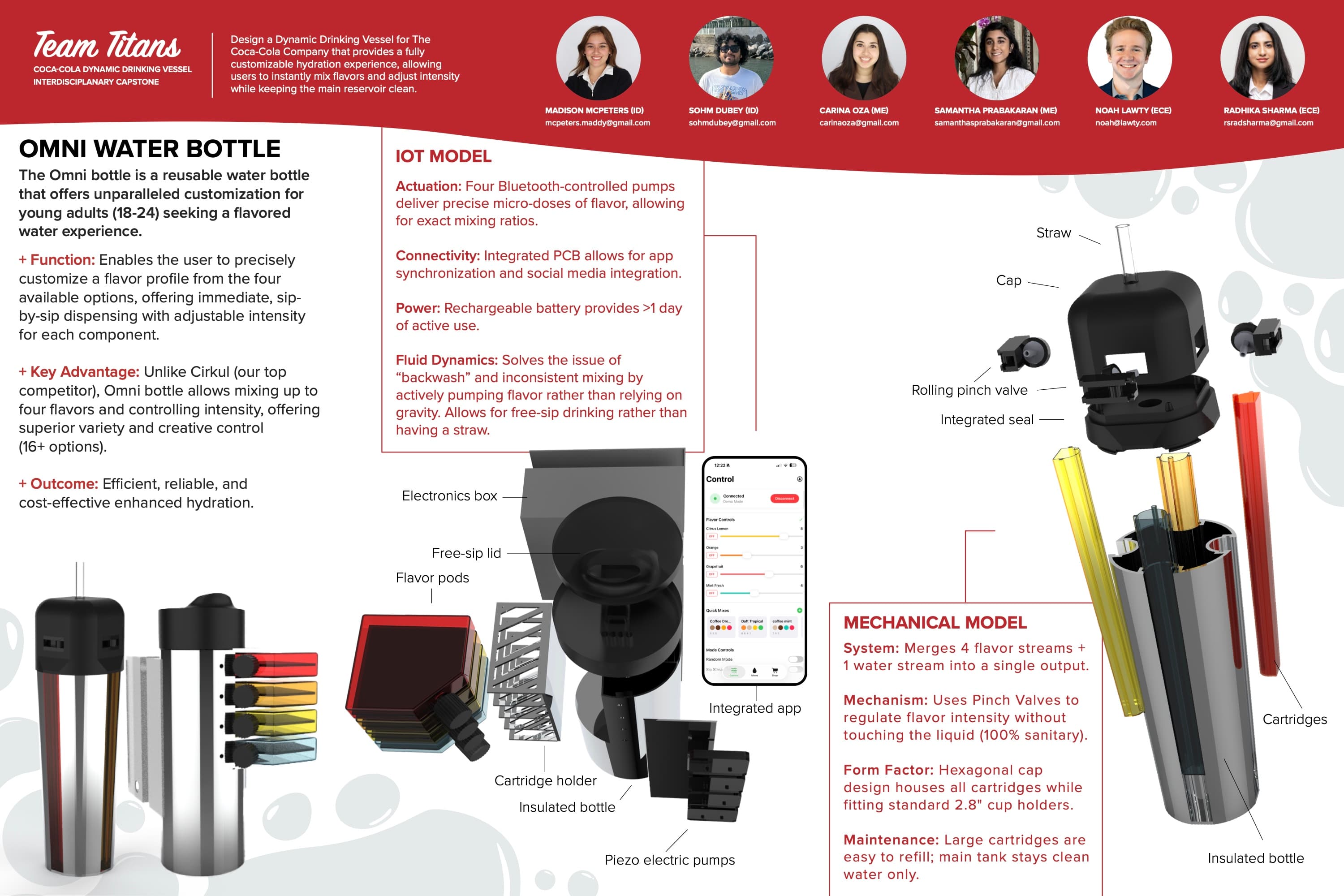
I led the product design for the Omni Water Bottle, shaping both the form factor and the internal architecture. Working with one mechanical engineer, I CAD'd two parallel designs in SolidWorks: an electronic version with Bluetooth-controlled piezo pumps, and a fully mechanical version using manual pressure valves as a low-cost fallback. Both share the same hexagonal cap housing up to four removable flavor cartridges around a central straw. The cap fits standard 2.8-inch cup holders while maximizing internal cartridge space. When the user sips, pumps inject precise doses of flavor concentrate into the water stream, so the main reservoir always stays as clean water.
The System
I worked across all three layers of the system: the mechanical assembly I co-designed in SolidWorks, the embedded firmware I wrote for the Arduino Nano 33 BLE, and the native iOS companion app I built in SwiftUI. The hardware and software communicate over Bluetooth Low Energy using a custom protocol with 14 characteristics across two services.
Hardware
- 4x Piezo-electric micro pumps (one per flavor channel)
- Arduino Nano 33 BLE (main controller)
- Custom PCB with dedicated motor driver ICs
- Tilt sensor for automatic sip detection
- Rechargeable LiPo battery (1+ day active use)
- Rolling pinch valves to prevent backflow
Software
- Arduino C++ firmware (non-blocking pump control)
- Swift / SwiftUI iOS app
- CoreBluetooth (14 BLE characteristics)
- SolidWorks 2024 (full mechanical assembly)
What Went Wrong
Over eight months, the project went through four major pivots. Each failure revealed a fundamental flaw in our assumptions and forced a redesign.
v1: Gravity Feed
Our first prototype relied on gravity to drip flavor from top-mounted pods into the water stream. Flow rate was inconsistent, impossible to control electronically, and stopped entirely at certain tilt angles.
Replaced passive gravity with piezo-electric micro pumps that actively push fluid. This gave us precise, electronically controllable dosing regardless of bottle orientation.
v2: Seal Failures
With pumps working, flavor began leaking between the cartridge housing and cap during normal use. The O-ring seals we selected deformed after repeated insertions and temperature changes.
I designed a rolling pinch valve mechanism in SolidWorks that physically pinches the tubing shut when pumps are off. Took three tolerance iterations between me and our ME to get the valve geometry right for reliable sealing.
v3: Power Delivery
When all four pumps ran simultaneously, the first driver board could not supply enough current. Pumps stalled under load and the Arduino brownout-reset, losing BLE connection.
Replaced the shared driver with dedicated motor driver ICs per channel and upgraded to a higher-capacity LiPo. Each pump now has its own power path, eliminating current starvation.
v4: State Sync
After the iOS app disconnected and reconnected (common during normal use), it displayed stale flavor values from the previous session instead of the Arduino's current state.
Added a full state synchronization on every BLE connection event: the app reads all four flavor characteristics from the Arduino before allowing any user interaction.
The Firmware
The Arduino firmware controls four pump channels independently using non-blocking timing. Each pump's frequency is mapped to a 1-to-10 intensity value received from the iOS app over BLE. A tilt sensor gates all dispensing so pumps only activate when the user tips the bottle to drink.
void freqControl() {
  long now = millis();
  int speed1 = pumpSpeed(Flavor1);
  if (now - freq1Time >= speed1) {
    freq1Time = now;
    if (digitalRead(frequencyControl1) == HIGH
        || Flavor1 < frequencyOn) {
      digitalWrite(frequencyControl1, LOW);
    } else {
      digitalWrite(frequencyControl1, HIGH);
    }
  }
  // Repeat for channels 2-4...
}

int pumpSpeed(long intensity) {
  int speed = map(intensity, 1, 10, 1, 60);
  speed = constrain(speed, 1, 60);
  return 500 / speed;  // frequency in ms
}The Companion App
I built the iOS app in SwiftUI. It connects to the bottle over CoreBluetooth, discovers two BLE services (flavor control and mode control), and syncs the current state from the Arduino on every connection. Users adjust four flavor intensity sliders that write values to the Arduino in real time. The app also supports saved "Quick Mix" presets and a random mode.
class BLEManager: NSObject, ObservableObject {
  @Published var isConnected = false
  @Published var syncedFlavorValues: [UInt8]? = nil

  private let serviceUUID = CBUUID(
    string: "19b10000-e8f2-537e-4f6c-d104768a1214"
  )

  func connect(to peripheral: CBPeripheral) {
    stopScanning()
    peripheral.delegate = self
    centralManager.connect(peripheral, options: nil)
  }

  // On connection: discover services, cache characteristics,
  // then read all 4 flavor values from the Arduino
  func peripheral(_ peripheral: CBPeripheral,
    didDiscoverCharacteristicsFor service: CBService,
    error: Error?) {
    guard let chars = service.characteristics else { return }
    for char in chars {
      self.characteristics[char.uuid] = char
      if char.properties.contains(.notify) {
        peripheral.setNotifyValue(true, for: char)
      }
    }
    if allCharacteristicsDiscovered {
      DispatchQueue.main.asyncAfter(deadline: .now() + 0.5) {
        self.readFlavorValues()
      }
    }
  }
}The Result
We demonstrated a fully working prototype to Coca-Cola engineers at the Georgia Tech Interdisciplinary Capstone Expo. The Omni Bottle mixes up to four flavors with individually adjustable intensity (over 16 possible combinations), controlled through the iOS app or automatically via tilt-to-dispense. The main water reservoir stays clean at all times, and flavor cartridges are simple to swap and refill. We delivered a complete technical binder, fabrication package, bill of materials, and the branded expo poster shown below.